
AI Tools Built for Your Business
Browse our full library of customizable AI automation tools covering SEO, PR, business development, and operations.
NisonCo Control Room: AI Orchestration Platform
An AI orchestration platform that runs Claude Code and Codex from one workspace. Agents work as an AI team in an org chart by role, projects and skills are shared across both, usage limits for both are tracked in one panel, and every action runs through approvals with a full record of what changed.
An AI orchestration platform for teams that use more than one model
Teams that use AI seriously end up with several tools open at once: one model for writing, another for code, a terminal, a browser, and no single record of what happened. Control Room is the orchestration layer over all of it. Claude and Codex run side by side in one workspace, a conversation can move from one model to the other mid-task without losing context, and every action, file change and approval is recorded in one place.
One workspace for Claude Code and Codex
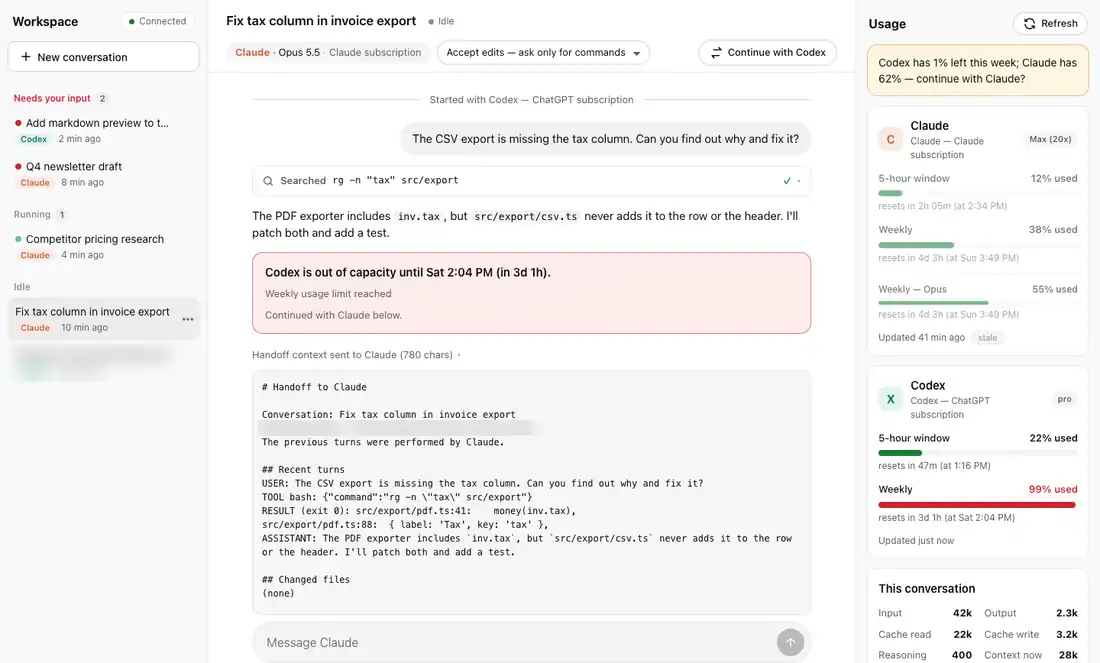
Teams that pay for both Claude Code and Codex usually juggle two apps, two sets of limits and two copies of their setup. Control Room runs both from one place. It imports existing Claude Code and Codex sessions, and keeps one skills registry that syncs skills between the two, so a skill written for one is available to the other. Skills and instructions can be scoped per project. Projects, agents and scheduled threads are shared, so the work stays in one place no matter which model does it.
Usage limits for Claude and Codex in one panel
The usage panel tracks Claude and Codex usage limits together. Weekly limits come first, with the percent left, whether you are on pace, and when each limit resets, followed by the 5-hour windows. When Claude hits its usage limit, the platform says so plainly and suggests continuing with Codex, with a context handoff you can preview before it is sent. Delegated tasks can pick the engine automatically: never one that is rate limited, and otherwise the one with more headroom and a better track record on that kind of task. Work paused by a limit can resume on its own when the limit resets.
Run your AI team like an org chart
Agents are organized the way a company is. A chief of staff sits at the top, managers cover finance, operations, marketing, sales and client services, and specialist roles sit under each one, such as blog, newsletter, proposals, payroll or backups. Each role has its own instructions, tools and projects. Managers delegate to their team and review the work before it moves up. The org chart view shows the whole AI workforce at a glance: which agent reports to which, what each one owns, and where work is waiting. A business can see its AI employees the same way it sees its people.
Approvals and a record of every change
Permission levels run from supervised, where every action asks first, to full access. Anything external, such as sending, publishing or pushing code, goes through an approval queue. Per-turn checkpoints and a side-by-side diff viewer show exactly what each step changed, and any change can be reverted.
Desktop, phone and remote access
The platform runs on your own machine, with an embedded terminal, a file browser, scheduled threads, and one shared registry of MCP tools. The same interface works on a phone over a private network connection, so approvals, usage and progress follow you.
Built as a working system
This is the system NisonCo uses to run its own AI operations, and it reflects how we set up AI teams for clients: more than one model, clear roles, clear controls, and a record of everything the AI did.
Get Started with NisonCo Control Room: AI Orchestration Platform
Send us a message to learn more or request access to this tool.
