
AI Tools Built for Your Business
Browse our full library of customizable AI automation tools covering SEO, PR, business development, and operations.
Browser Bridge MCP
Provides 182 browser automation tools across 21 toolkits for AI agents like Claude Desktop, Claude Code, and Cursor, enabling real Chrome control for SEO audits, testing, debugging, and security scans via the Model Context Protocol.
182 Browser Automation Tools for AI Agents
Browser Bridge MCP gives AI coding assistants the ability to see, interact with, and automate your actual Chrome browser, not a simulated or headless environment, but the same browser where you are logged in, have your extensions installed, and see your real browsing data. With 182 automation tools organized into 21 on-demand toolkits, it bridges the gap between what AI assistants can reason about and what they can actually do in a browser.
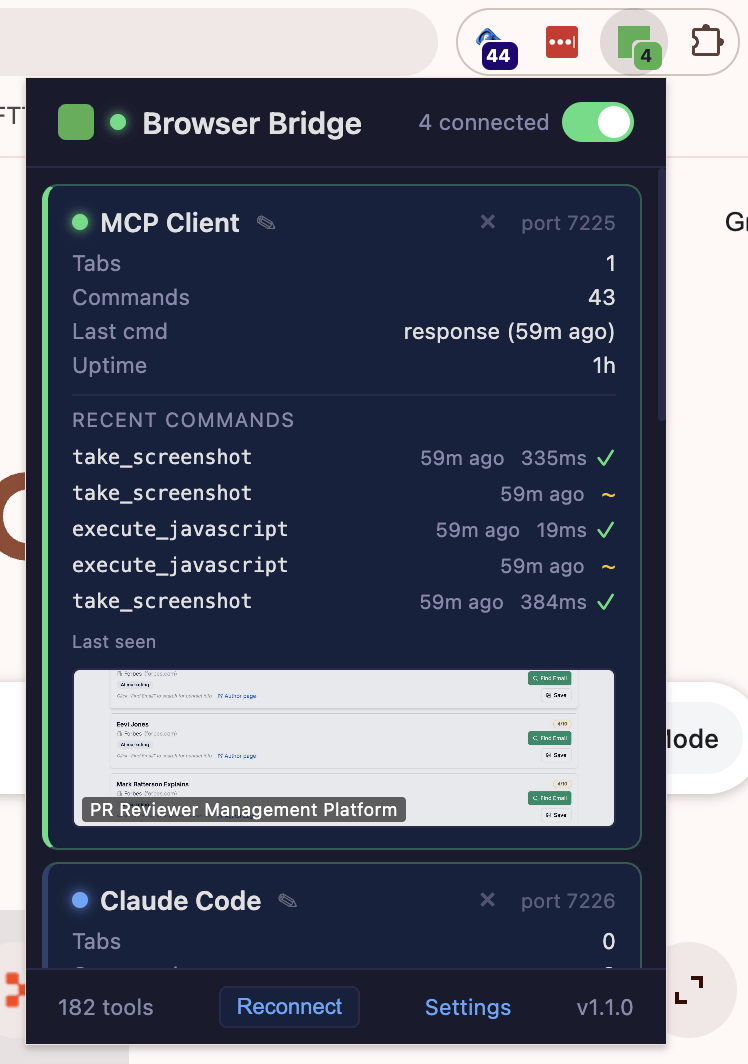
The live extension confirms the scale: 182 tools in version 1.1.0, with support for 3 simultaneous client connections. In production use, Claude Code has executed 22 commands in a single session across 4 tabs, with screenshot operations completing in 270ms, confirming the low-latency performance critical for AI agent workflows.
Smart Tool Loading
Rather than overwhelming AI assistants with all 182 tools at once, the system loads only 25 essential tools by default, keeping the AI fast and focused. When a task requires specialized capabilities, additional toolkits load on demand. A universal tool dispatcher can also call any of the 182 tools directly without loading its parent toolkit, providing maximum flexibility with minimum overhead.
Core Browser Control
The foundational toolkit covers everything needed for general browser interaction: navigating to URLs, clicking elements, typing text, reading page content, taking screenshots, finding elements by selector or visible text, and waiting for page loads or dynamic content.
SEO Audit and Analysis (12 Tools)
A dedicated SEO toolkit performs full site audits, multi-page site crawling, SERP comparison analysis, page speed evaluation, and structured data validation. These tools let AI assistants conduct comprehensive SEO reviews without leaving the conversation, crawling pages, analyzing performance metrics, and generating audit reports in real time.
Testing and Quality Assurance (10 Tools)
The testing toolkit supports assertions, automated test running, responsive design testing across viewport sizes, and accessibility compliance checks. AI assistants can verify that a web application works correctly across devices, meets accessibility standards, and handles edge cases properly.
Debugging and Network Analysis (16 Tools)
Console log capture, network request recording and interception, and DOM change monitoring let AI assistants diagnose issues in real time. The network tools can intercept and modify requests, enabling testing of error states, slow connections, and API failures without modifying application code.
Developer Tools (13 Tools)
Framework detection for React, Vue, and Angular allows context-aware interactions with modern web applications. The toolkit detects hot module replacement from popular build tools and performs form handling that correctly works with modern single-page applications and their state management patterns.
Security Scanning
Security-focused tools audit HTTP headers, cookie configurations, HTTPS implementation, CORS policies, and cross-site scripting vulnerabilities. This turns an AI assistant into a first-pass security reviewer that can flag common web application vulnerabilities during development.
Advanced Capabilities and Additional Toolkits
Screenshot comparison tools detect visual regressions between page versions. Device emulation simulates mobile and tablet viewports for responsive testing. PDF generation creates document exports from any web page. Additional specialized toolkits (12 more beyond those described above) cover iframe handling, session management, mobile interactions, media elements, browser storage, UX evaluation, and design analysis.
Multi-Client Connections and Reliability
The system supports multiple simultaneous client connections (3 demonstrated in production), meaning different AI assistants or sessions can share control of the browser. A reconnection resilience system queues commands for 60 seconds during connection interruptions. Chrome Tab Groups visually mark which windows are under AI control so users always know what the assistant is doing. Remote access via secure tunnel with token-based authentication enables use from any environment.
Compatibility
Works with Claude Desktop, Claude Code, Cursor, and VS Code, any environment that supports the MCP protocol. Version 1.1.0 is in production with a 37/37 self-test suite passing. Correctly handles modern single-page applications, including dynamic form inputs and client-side routing.
Get Started with Browser Bridge MCP
Send us a message to learn more or request access to this tool.
